Building a pipeline
Create a pipeline, define a schema, upload documents, review extractions, and export structured data.
A pipeline turns a batch of documents into structured data. You set it up once — a name and a schema — then run as many documents through it as you like.
Create a pipeline
From your Workspace, choose + New → Database, then give the pipeline a name and an optional description.
Define a schema
The schema is the list of fields you want to extract from each document. For every field you set:
- Field name — a unique identifier, e.g.
invoice_numberortotal_amount. - Field type — text, number, date, boolean, currency, email, or url.
- Required — whether the field must be present in every document.
- Description — a short note that helps the AI understand what to extract.
Clear field descriptions are the single biggest lever on accuracy. Starting from the Template Library — pre-built schemas for invoices, receipts, contracts, and more — saves time on common document types.
Upload documents
Drag and drop your files, or browse to them. Supported formats are PDF, DOCX, XLSX, CSV, and TXT, up to 50MB per file, and you can upload a whole batch at once.
Monitor processing
Each document moves through a few states as it's read and extracted:
| State | Meaning |
|---|---|
| Pending | Waiting to be processed. |
| Processing | Being extracted by AI. |
| Completed | Extracted successfully. |
| Review required | Low confidence — needs a human look. |
| Failed | Could not be processed. |
Review and approve
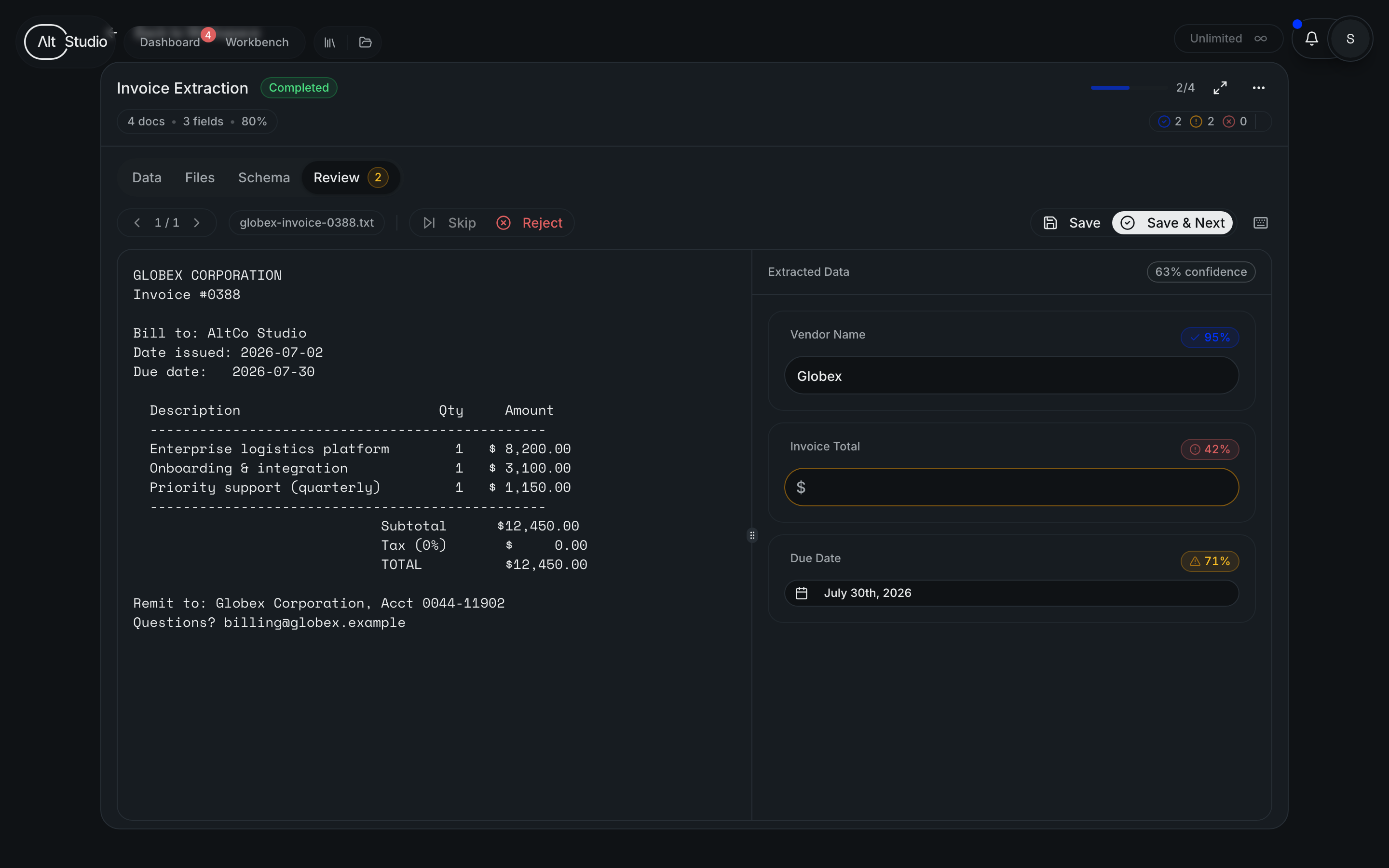
For anything flagged Review required, the review view shows the original document beside the extracted data. Correct any fields that need it, then approve or reject the extraction. You can tune the confidence threshold to control how much gets flagged for review versus accepted automatically.
Export
Export the structured data in the format that fits where it's going: CSV for spreadsheets, JSON for applications and APIs, or Excel (XLSX).
Tips
- Write clear field descriptions — they do more for accuracy than anything else.
- Reuse templates for document types you process repeatedly.
- Always review low-confidence extractions before you rely on the data.
AltStudio can also connect to external data sources beyond document extraction. Those connections are covered separately.