Using connector tools
Once a service is connected, its tools are available to Alto in conversation and to nodes on the canvas.
A connection's value is in its tools — the reads and actions it exposes. After you've connected a service, those tools are available in the two places you do work: a conversation with Alto, and the canvas.
In a conversation
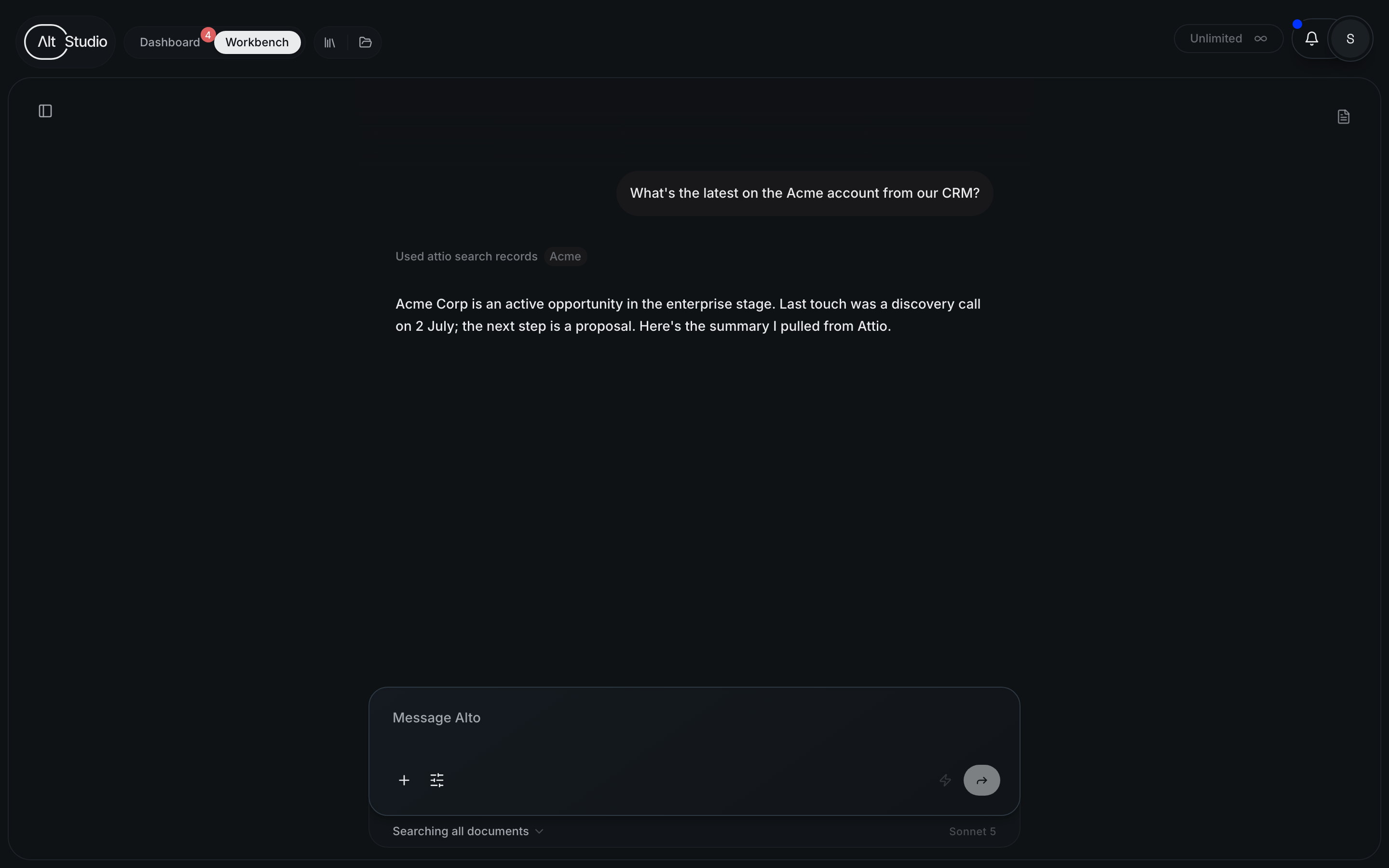
Ask Alto to do something that needs an external system and it can reach for the relevant connected tool — looking up a record, pulling recent data, or taking an action — then fold the result into its response. You stay in plain language; Alto chooses the tool.
On the canvas
On the canvas, a node can use connected tools as part of a step — for example, an AI step that reads from an external system before producing its output. This lets a workflow draw on live data from the services you've connected.
Tools only appear once their service is connected. If an expected tool is missing, check that the connection is healthy in Settings → Connectors.
Keeping connections healthy
Tools depend on a working connection. If authentication expires or a server becomes unreachable, its tools stop being available until you reconnect — so it's worth glancing at connection status in Settings → Connectors if something that worked before stops responding.
Connecting an MCP server
Add an external service to AltStudio by connecting its MCP server and authenticating it.
Using AltStudio in Claude
AltStudio exposes its own MCP server, so you can connect your workspace to Claude (or any MCP client) and work with your real context — canvases, knowledge, entities, reference files, and data — right there.