Citations & sources
When Alto or an agent makes a claim, it cites the source behind it — so every statement is traceable, and you can see and audit exactly where an answer came from.
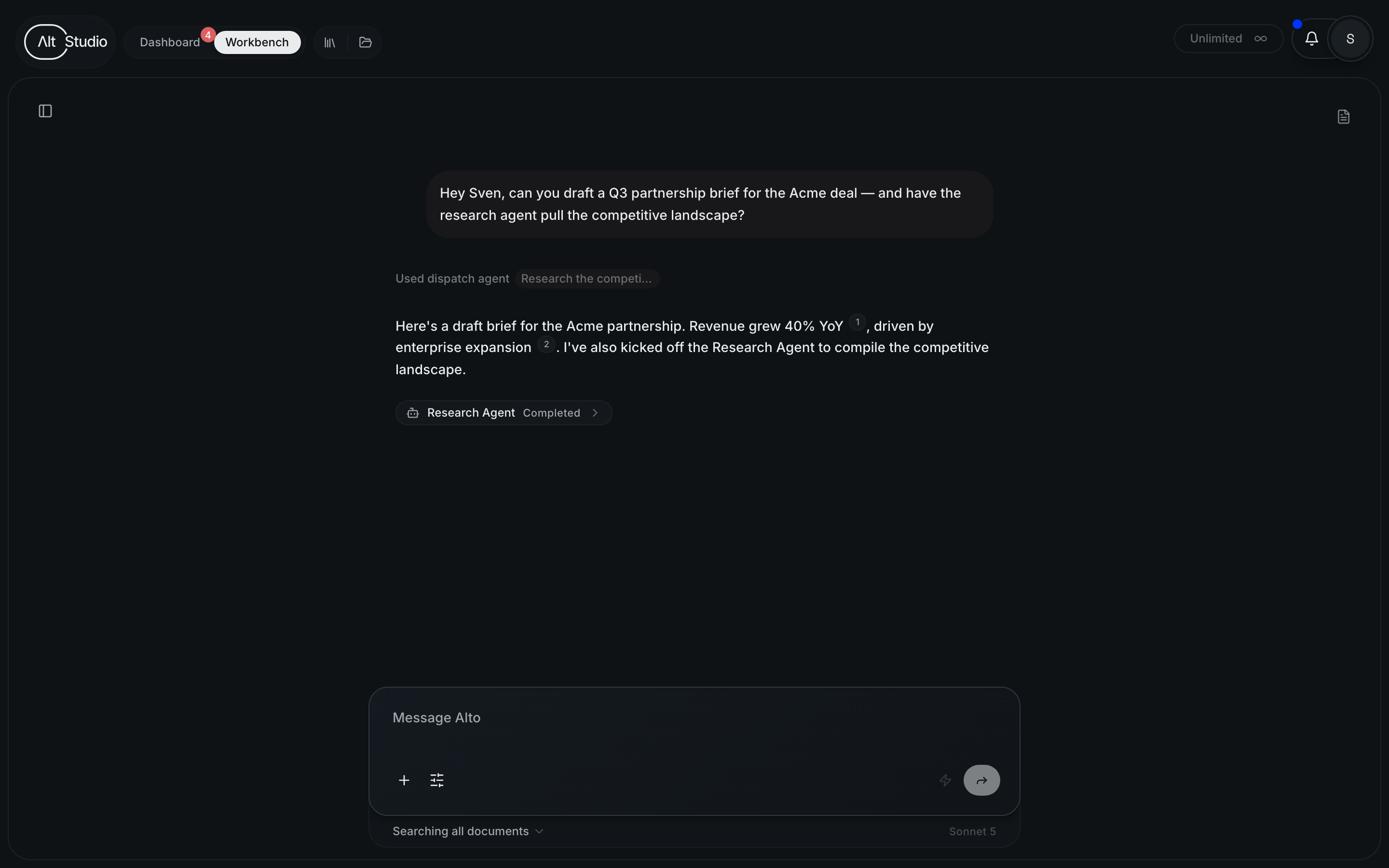
AltStudio doesn't ask you to take its word for it. When Alto or an agent states
a fact, it attaches a citation — a numbered marker like [1] that links to
the exact source the claim came from. Click it, and you go straight to the
document, page, or record behind the statement.
This is what makes output you can actually put in front of a client: not a black box, but a chain of claims you can trace back to real material.
What can be cited
Citations point to real sources that were retrieved while the work was produced — never to the model's own background knowledge. The sources that can be cited:
| Source | What it is |
|---|---|
| Documents & knowledge | Files retrieved from your knowledge store during the work. |
| Reference files | Standalone documents in the store — including ones an agent wrote itself, which it can cite in the same turn it creates them. |
| Transcripts | Meeting and call transcripts brought into the store. |
| Web sources | Pages found via web search, or fetched and read directly from a URL. |
| Canvas content | Content from nodes on a canvas — cited node by node. |
| Connected tools | Data pulled from an integration (for example a connected notes or project tool). |
A citation always resolves to a specific source — for a document, down to the passage that was used; for a canvas, down to the individual node. That precision is what makes it auditable rather than decorative.
Where citations appear
Citations show up everywhere work is generated — inline in Alto's chat
replies, in the outputs of canvas nodes, and in the results of
agents running in the background. Wherever you see a [1], you can open it
to reveal the source, its title, and the passage behind the claim.
Transparency & auditability
Because every cited claim carries its source, a finished deliverable is fully traceable. You — or a reviewer, or a client — can follow any statement back to where it came from and judge it on the evidence. Nothing important rests on an assertion you can't check.
- See the working. A report isn't just conclusions; it's conclusions with their sources attached.
- Audit after the fact. Come back to a document weeks later and still see exactly which material each point was drawn from.
- Catch drift. If a source doesn't say what a claim implies, the citation makes that easy to spot — because the source is one click away.
How citations stay honest
AltStudio actively guards against the failure mode of AI citations — markers that point to nothing, or to the wrong thing:
- Only real, retrieved sources become citations. Broad "search to find things" results aren't citable on their own; a source has to actually be retrieved and used before it can be cited.
- No citation without a source. The system won't present a
[1]as valid unless it maps to a genuine source from that run — a marker with nothing behind it is flagged, not shown as if it were real. - Relevance matters. When a source is a close-but-not-certain match, it's treated as a candidate to be judged on subject, not assumed correct.
A citation means "this points to a real source that was retrieved for this work" — the marker can't be fabricated, and one that doesn't resolve to a genuine source is flagged rather than shown as valid.
The memory curator
A background curator that keeps your knowledge graph deduplicated and its summaries fresh — so every agent reads from a cleaner, more current store, with no upkeep from you.
Creating outputs
The deliverables AltStudio produces — documents, designed documents, and presentations — and how to export and share them.